About this template
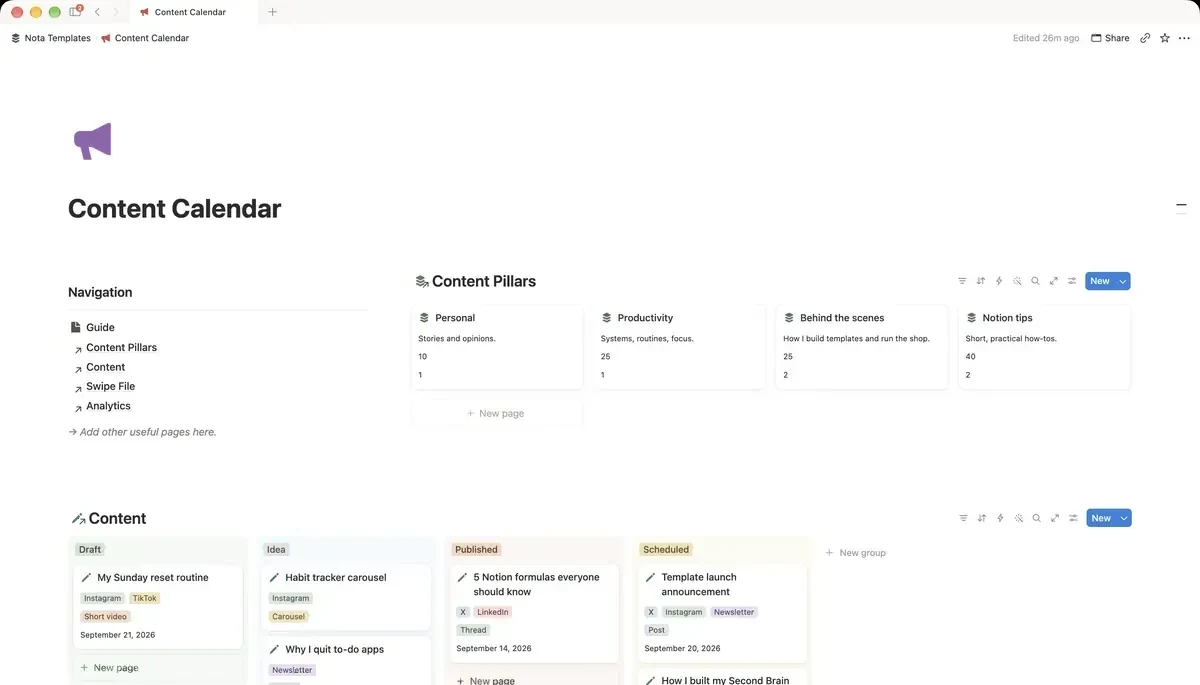
A creator-focused pipeline from idea to published. Kanban by status, calendar by publish date, and a swipe file for hooks that worked.
What's inside
- Idea to Published board
- Seven platform tags
- Calendar by publish date
- Swipe file for hooks that worked
- Analytics log per post
How it works
- 1Complete checkout and open the link in your email.
- 2Click “Duplicate” in the top-right corner of the Notion page.
- 3The template is now in your workspace. Make it yours.
Who it's for
For creators who publish to more than one place and lose track of what went where. If you have ever rewritten a post you had already written, or forgotten which hook performed well, this is the fix. Ideas move along one board from first thought to published, and what worked gets kept instead of forgotten.
Your first week
- 1Empty your notes app into Ideas. Every half-thought counts — the board is where they get filtered, not your memory.
- 2Tag each idea with the platforms it suits. One idea usually becomes three posts.
- 3Drag two ideas to Drafting. Resist doing more; a clogged board is worse than an empty one.
- 4After publishing, log the numbers and move the hook that worked into the swipe file.
What it doesn't do
It does not publish for you. There is no scheduler and no platform integration — Notion cannot post to Instagram or X. This plans and remembers; you still press publish yourself.
Questions
Which platforms does it cover?+
Seven tags come set up, and you can rename or add to them freely. They are plain select options, not integrations.
Can I schedule posts from here?+
No. Nothing in Notion can post to a social platform on its own. Use this to decide what goes out and when, then publish in the app itself or a scheduling tool.
What is a swipe file for?+
Keeping the openings that actually earned attention. Most creators write a good hook once and then forget the phrasing — this stores them where you will look next time you are stuck.